
Happy Wheels Level Editor: Build, Publish and Fix It
How the Happy Wheels level editor works: which platforms have it, what you can place, how to publish a level, and what to check when it will not show up.

The Happy Wheels level editor is not a side feature. It is a headline capability that the developer advertises on Steam, where the feature list literally reads “Includes level editor”. The store description opens with “Fully featured Level Editor — build and share your own courses”. The workflow is straightforward: open an empty level slot, draw the terrain, place hazards and props, wire mechanisms to triggers, playtest until you can finish your own level, then save and submit it so other players can find and rate it in the Level Browser.
Check whether your platform has it at all
This is the step that wastes the most time, because the three platforms are not the same.
| Platform | Editor confirmed? | Notes |
|---|---|---|
| Browser / Steam | Yes | “Includes level editor” is a Steam category, and the description promises you can build and share courses |
| iOS | Yes | The App Store description states “Create your own levels in the editor” |
| Android | Not listed | The Google Play description only mentions 60+ levels, hazards and physics. Player reviews also complain that level creation is missing |
So if you cannot find the editor on a phone, do not assume you did something wrong. The Android version very likely does not have one, though the developer has never posted an announcement about it. Treat it as “not listed officially, reported missing by players”.
What you can put in a level
The developer has never published a complete object list, but the feature description and the update notes confirm the categories: terrain and platforms, hazards (spikes, mines, wrecking balls, harpoons), interactive props, and the most important piece, triggers. Triggers are what turn a course from a static obstacle run into a machine.
Two official 2015 update notes are the most concrete evidence available. Harpoon guns can be set to a fixed angle, fired by a trigger, or switched on and off by a trigger, with a coloured light showing the state (red normal, blue fixed angle, green trigger-only, black disabled). Boost panels went from a fixed power of 20 to an adjustable 10 to 100. A separate update that year let triggers fire from a mouse click, by setting “triggered by” to 6, and let one trigger drive multiple actions on most objects.
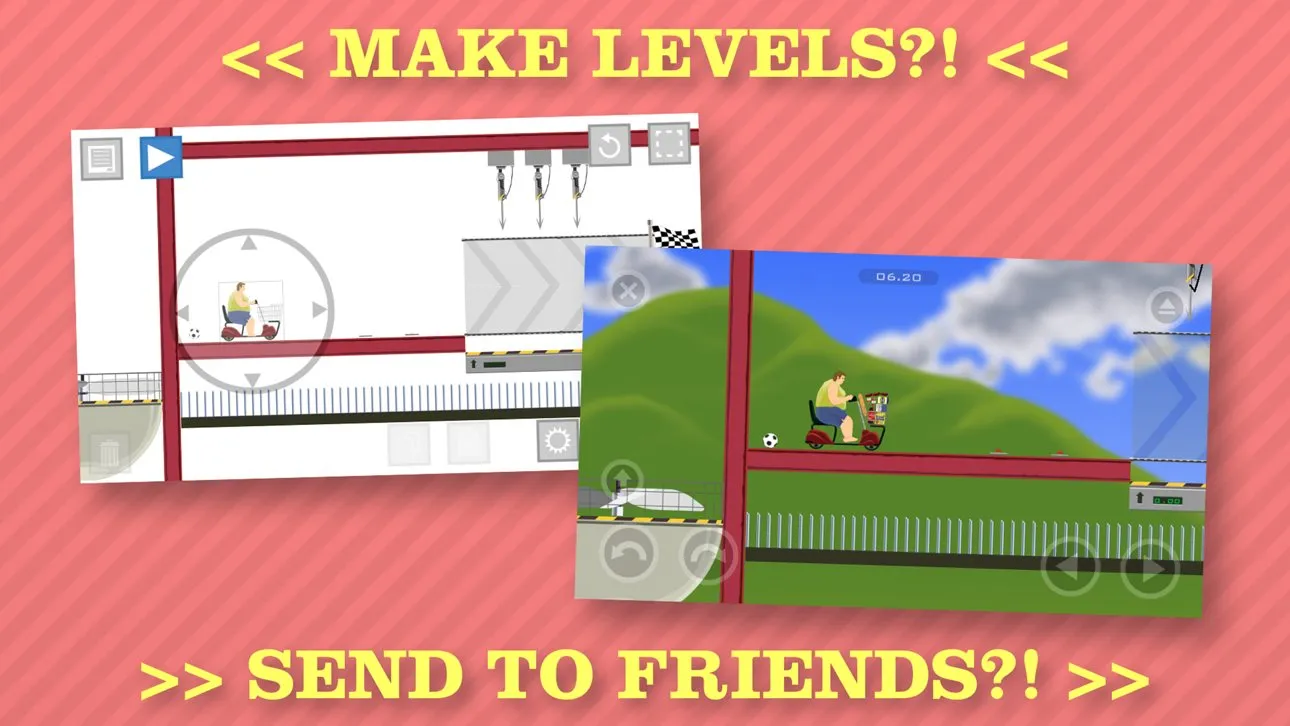
Official App Store screenshot confirming that the iOS version does include level creation (Jim Bonacci / Fancy Force)
Building a level from scratch
- Open the editor and create a level. Build a small test course first rather than a giant machine map.
- Draw the terrain. Finish the ground and platforms before you think about hazards. Doing it the other way round makes the trap count spiral.
- Place hazards and props. Add one kind at a time and playtest as you go, so you notice which combination kills instantly.
- Wire up the triggers. Connect each mechanism to its condition, and be clear about what the player does to make what happen.
- Finish your own level at least once. Players do not forgive levels that cannot be completed, and they rate them accordingly.
- Save and submit. Once submitted it enters the user level pool, where others find it by most recent, most played or highest rated.
When the editor will not show up
Work through these in order instead of reinstalling anything: check the platform (Android very likely has no editor), check the version (the browser version lives at totaljerkface.com, and copies on third-party sites often have features stripped out), then check your login state and whether the page loaded properly. The recurring “Level Editor not showing up?” threads in the community land on one of those three.
For finding levels other people built, and for deciding which ones are worth your time, see the filtering advice in the beginner guide. Platform differences are covered in the mobile comparison.